
A laptop lock is the cheapest insurance you can buy for the most expensive thing you carry every day. A good laptop lock costs less than a takeaway dinner, weighs almost nothing, and turns a grab-and-run theft into a struggle a thief will not bother with. The wrong one, though, is barely more than a piece of string: a thin cable that snips in seconds, a combination dial a curious stranger can guess, or a head that never quite fits the slot on your machine. In 2026 the choice is wider than ever, and it still rewards a careful buyer.
This guide explains how laptop locks actually work, which type suits your routine, and what to check before you spend anything. Whether you work from coffee shops, study in a library, or hot-desk in a shared office, there is a lock here that will keep your laptop where you left it.
Key Takeaways
- A laptop lock deters opportunistic theft; it will not stop a determined thief with tools and time, so pair it with common sense about where you leave your machine.
- Check your laptop’s slot type first — the classic Kensington T-bar slot, the smaller Noble wedge slot, or no slot at all — because the wrong head simply will not fit.
- A braided steel cable at least 1.5 metres long, with a cut-resistant core, is the minimum worth buying; thin vinyl-coated cables are easy to snip.
- Combination locks suit shared desks and travel, since there is no key to lose; keyed locks suit offices where one person owns the lock.
- Always anchor to something fixed and heavy — a desk leg, a table frame, or a purpose-made anchor point — never to a chair a thief can simply carry away.
How a Laptop Lock Actually Works
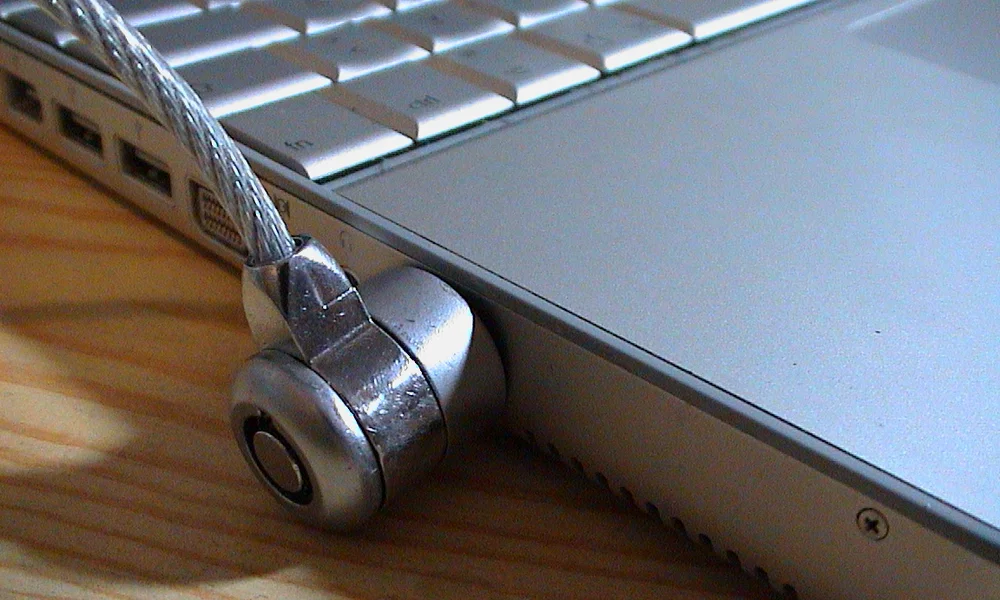
Every laptop lock has the same three parts: a head that grips the laptop, a cable that connects the head to something fixed, and a locking mechanism. The head slides into a small reinforced slot on the side of the laptop — the Kensington security slot — and a T-shaped bar inside rotates to grip the slot from within. Once locked, the head cannot be pulled out without breaking the laptop’s chassis, which is exactly the point: a thief would have to damage the machine to take it.
The cable is the part most people underestimate. Early locks used thin braided wire that pocket snips could cut in seconds, and some still do. Modern locks use thicker steel cable, often with a cut-resistant core under a vinyl coating. Length matters too: 1.5 to 1.8 metres reaches from a laptop on a desk to a table leg or floor anchor without dragging the machine to the edge, while a short cable forces awkward placements that tempt you to skip locking altogether.
The locking mechanism is where keyed and combination designs part ways. A keyed lock opens with a small flat key, like a miniature padlock, and usually comes with a spare. A combination lock opens with a four-digit code you set yourself, and most resettable models let you change it whenever you like. Neither is inherently more secure; the difference is practical. Keys get lost, codes get forgotten, and the right choice depends on which of those two failures you are more likely to commit.
The Slot on Your Laptop Matters Most
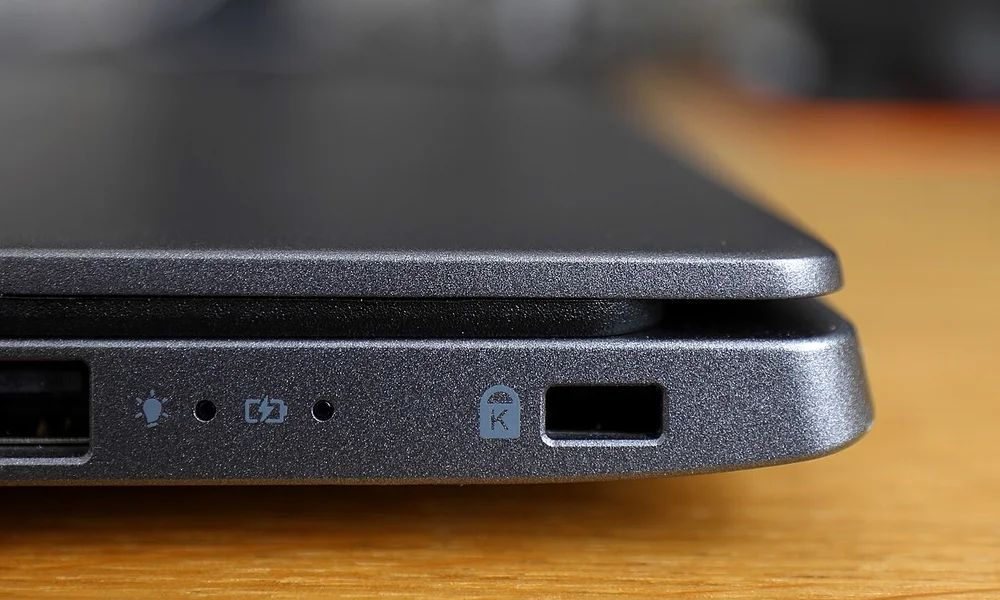
Before buying any lock, look at the side of your laptop. Most business laptops — ThinkPads, Latitudes, EliteBooks — still carry the classic Kensington slot, a rectangular hole roughly 7 millimetres by 3 millimetres. Many slim ultrabooks, including recent Dell XPS and HP Spectre models, use the smaller Noble wedge slot instead, which needs a wedge-shaped head. Some very thin machines, including most Apple MacBooks, have no security slot at all, and for those you need a lock with an adhesive anchor plate or a clamp that grips the laptop’s edge.
Buying a lock without checking the slot is the single most common mistake. A minute with a torch saves a return. If your laptop has no slot, do not force a standard head into a vent or a port: you will damage the machine and the lock will still pull free.
Keyed, Combination or Smart: Which Lock Type Suits You
Keyed locks are the oldest design and still the most common in offices. They are simple and reliable — but the key is also their weakness. Lose it, and your laptop is tethered to the desk until a locksmith intervenes. Offices that issue one lock per desk usually prefer keyed models because a facilities manager can hold a master key.
Combination locks trade a little mechanical simplicity for freedom from keys. A four-digit code gives 10,000 possible combinations, enough to defeat casual guessing, and a resettable dial lets you change the code when a colleague leaves. The weakness is human: people choose birth years and repeated digits. Pick a code with no personal meaning and change it once a year.
Smart locks, which unlock with a phone app or a fingerprint, are the newest option and the least proven. They are convenient — no key, no code to remember — but they add a battery, an app, and a Bluetooth connection to a device whose only job is to be simple and reliable. For most buyers, a good mechanical lock remains the better choice.
What Makes a Good Laptop Lock
Start with the cable. Look for braided steel at least 5 millimetres thick, with a vinyl coating that protects both the cable and your desk. A cut-resistant core — a second, harder steel strand inside the braid — is worth paying extra for, because it turns a five-second snip into a noisy job. Avoid locks whose cable feels light and springy: that usually means thin wire under thick plastic.
Next, check the head. A good head sits flush against the laptop’s side with no wobble, and the locking bar engages with a firm click. Cheap heads rock in the slot, which wears it over time and lets a thief work the head loose. Buy from a brand that names the slot standard it fits — Kensington, Noble, or a universal head that lists both — rather than a no-name lock that promises to fit everything.
Weight matters more than most buyers expect. A lock that lives in your bag should weigh under 200 grams and coil neatly; a heavy lock with a stiff cable gets left at home, and a lock left at home protects nothing. Coiled cables pack smaller but can tug a light laptop across a smooth desk, so a straight cable usually suits ultrabooks better.

Comparison Table
| Lock type | Best for | Needs a slot | Main weakness |
|---|---|---|---|
| Keyed cable lock | Offices, shared desks | Yes | Lost keys |
| Combination cable lock | Travel, libraries, students | Yes | Weak or guessed codes |
| Anchor plate lock | Slot-less laptops | No | Permanent adhesive plate |
| Clamp lock | Borrowed or shared laptops | No | Bulky, can mark finishes |
| Smart lock | Tech-comfortable users | Yes | Battery, app and Bluetooth |
Using Your Lock Well: Habits That Matter More Than the Hardware
A lock only works if you use it, and the habit is worth more than the hardware. Lock your laptop every time you leave it, even for a minute — most thefts happen in under thirty seconds, while the owner is ordering coffee or visiting the bathroom. Loop the cable through something that cannot be lifted: a desk leg bolted to the floor, a heavy table frame, or a fixed anchor point. A chair or a lightweight side table is not an anchor; a thief simply carries the whole thing away.
At home, a lock is a sensible extra layer alongside the safe where you keep passports and spare keys — a safe protects things you rarely need, a lock protects a machine you use every day — and our guide to home safes that protect what matters most explains how to choose one.
Travelling With a Laptop Lock
On the road, a combination lock is the most practical choice: no key to lose in a hotel room, and a code you can share with a travelling companion. Loop the cable around a fixed fitting — a radiator pipe, a heavy wardrobe rail, or the desk leg — and keep the laptop out of sight from the doorway. In airports and on trains, lock the laptop to your own bag and keep the bag between your feet.
One thing a lock cannot do is protect the data on the laptop. Set a strong login password, turn on full-disk encryption, and keep a backup of anything you cannot afford to lose. A lock protects the hardware; encryption protects everything it contains. A good laptop bag that protects your gear also helps on the move, since padding and a snug fit stop the knocks that damage a machine long before a thief ever sees it.
Checklist: Before You Buy a Laptop Lock
- Check which slot your laptop has — Kensington, Noble wedge, or none — and buy a head that fits it exactly.
- Choose a braided steel cable at least 1.5 metres long and 5 millimetres thick, with a cut-resistant core.
- Pick keyed for a fixed office desk, combination for travel and shared spaces, and skip smart locks unless you already like managing one.
- Test the head in the slot: it should sit flush with no wobble and engage with a firm click.
- Keep the total weight under 200 grams if the lock will live in your bag every day.
- Plan your anchor point in advance — a fixed desk leg, a table frame, or a floor anchor — and make sure the cable reaches it.
Frequently Asked Questions
Will a laptop lock fit my MacBook?
Most MacBooks have no security slot, so a standard cable lock will not fit. You need an anchor plate lock that bonds to the lid or a clamp lock that grips the edge, and you should accept that either option is a compromise compared with a built-in slot.
Can a laptop lock be cut?
Yes — any cable can be cut with the right tools and enough time. A good lock buys time and noise: a thick braided cable with a cut-resistant core takes minutes and proper cutters, which is enough to defeat the opportunistic theft that a lock is designed to stop.
Is a combination lock or a keyed lock more secure?
Neither is meaningfully more secure than the other. Keyed locks fail when keys are lost; combination locks fail when codes are weak or shared. Choose based on your habits, not on a security ranking.
Does a laptop lock damage the laptop?
A well-fitted head does not damage the slot, though a loose one can wear it over time. Clamp locks can mark soft finishes if over-tightened, and adhesive anchor plates are effectively permanent.
Can I use a laptop lock with a laptop sleeve?
Yes, and it is a sensible pairing: the sleeve protects against knocks and the lock protects against theft. A slim laptop sleeve for protection without the bulk fits inside your bag alongside the coiled lock.
What should I do if I lose the key or forget the code?
Keep the spare key somewhere other than the bag the lock lives in, and store the combination in a password manager rather than on a sticker. If both fail, a locksmith can usually remove a lock head, but it is slow and costs more than the lock itself.
The Bottom Line
The best laptop lock for most people in 2026 is a combination cable lock with a thick braided steel cable, a head that fits their laptop’s slot exactly, and a length that reaches a proper anchor point. It is cheap, light, and simple enough to use every single time you leave your laptop — and that habit, more than any feature on the box, is what keeps your gear safe.


