
The best laptop bags are the ones that protect your gear so well you stop worrying about it. A laptop is usually the most expensive thing you carry every day, and a cheap bag with a thin sleeve and a flimsy zip is an accident waiting to happen. One hard knock on a train door, one sudden downpour, or one drop from a desk can crack a screen or damage a hard drive, and no warranty covers a bag that never protected the laptop in the first place. This guide explains what separates a genuinely protective laptop bag from a good-looking tote with a laptop pocket, and how to choose one in 2026 that fits your laptop, your commute, and your back.
A laptop bag has two jobs, and most bags only do one of them well. The first is protection: padding around the laptop, a suspended sleeve that keeps it off the ground, and a shell that resists rain and bumps. The second is carrying: comfortable straps, sensible weight, and pockets arranged so you can find your charger without emptying the whole bag on a station platform. A bag that hurts your shoulder after twenty minutes will end up in a cupboard, and a comfortable bag that leaves your laptop rattling around is not doing its main job.
Key Takeaways
- Measure your laptop before you buy, because a bag that is even a centimetre too small is useless, and a bag that is far too big lets the laptop slide around and take knocks.
- A suspended, padded sleeve matters more than the outer material: it keeps the laptop off the bottom of the bag, where most drops land.
- Water resistance is not the same as waterproof, so look for a rain cover or genuinely water-resistant fabric if you walk or cycle in the rain.
- Comfort decides whether you use the bag every day, so check the shoulder strap, the back padding, and the loaded weight before you commit.
- Good organisation saves more time than extra pockets: a charger pocket, a cable pocket, and a quick-access pocket for a phone and keys are enough for most people.
What a Laptop Bag Has to Protect Against
A laptop is fragile in ways that are easy to forget when it is sitting safely on a desk. The screen is a thin sheet of glass that cracks under pressure, the corners dent when a bag is dropped, and the ports and hinges wear out when a laptop rattles against a charger and a water bottle. A good laptop bag is designed around those weaknesses, and it is worth understanding them before you start comparing bags, because the features that matter are not always the ones in the product photos.
Drops and knocks
Most laptop damage happens at low height: a bag slipped off a shoulder, a bag knocked off a chair, or a bag set down too hard on concrete. The impact travels straight through a thin bag into the corner of the laptop, and that is why a suspended sleeve matters so much. A suspended sleeve hangs the laptop a centimetre or two above the bottom of the bag, so when the bag hits the ground, the laptop does not.
Rain and spills
Rain is the second great enemy of a laptop, and it is the one most bags handle badly. A bag made of ordinary canvas or nylon will soak through in a heavy shower, and water that gets into the laptop compartment can kill a laptop even if the screen never cracks. Water-resistant fabric, sealed zips, and a storm flap over the main zip all help, and a separate rain cover is the simplest reliable answer for anyone who walks or cycles in bad weather.
The Main Types of Laptop Bag
Laptop bags come in four main shapes, and the right one depends on how you travel rather than how the bag looks. A briefcase suits an office worker who drives or takes a short train, a backpack suits a commuter who walks or cycles, a messenger bag suits someone who needs quick access, and a sleeve suits someone who already has a bag they like and only needs protection. Most people end up with one main bag and a sleeve for travel, and that combination covers more situations than any single bag.
Briefcases and messenger bags
A briefcase is the classic laptop bag: professional, easy to carry by hand, and easy to slip under a desk. Its weakness is comfort on a long walk, because all the weight hangs from one shoulder. A messenger bag is similar but usually softer and more casual, with a flap that gives quick access to the laptop and a front pocket for a notebook.
Backpacks
A laptop backpack spreads the weight across both shoulders, which makes it the most comfortable choice for a long commute, a cycle ride, or a day of walking. The best ones have a padded, suspended laptop compartment at the back, a chest strap to stop the bag bouncing, and a luggage strap that slides over a suitcase handle. Their weakness is access: you usually have to take the bag off your back to get the laptop out.
Sleeves and slim cases
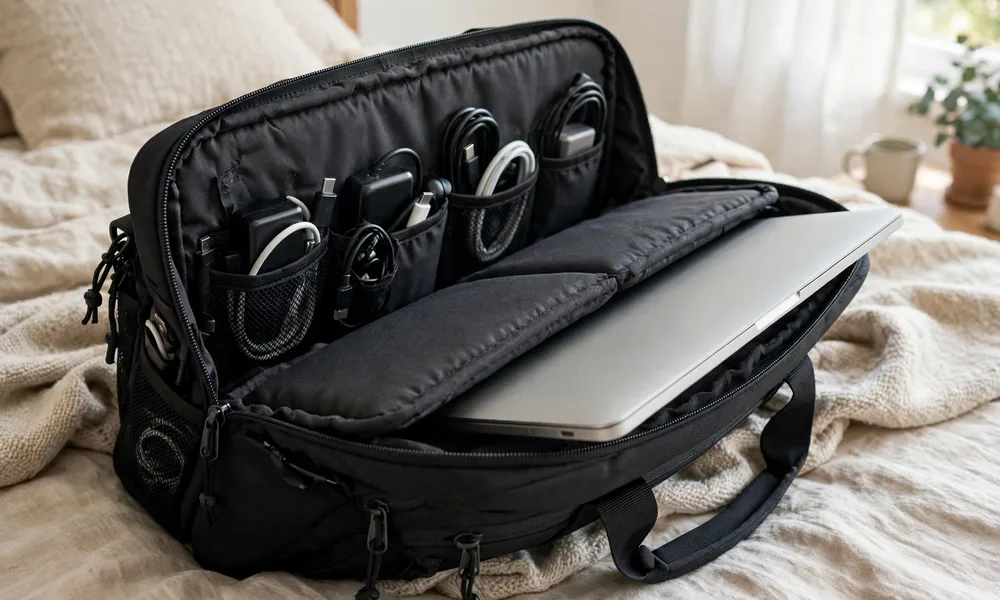
A sleeve is a padded case that holds only the laptop, and it is the cheapest way to add real protection to any bag. A good sleeve has thick padding, a snug fit, and a water-resistant outer. The drawback is that a sleeve protects only the laptop, so your charger and cables still need a home.
How to Choose the Right Size
Size is the first thing to get right, and it is also the easiest to get wrong. Laptop sizes are quoted by screen size, so a 14-inch laptop usually fits a 14-inch bag, but the actual dimensions of the laptop matter more than the screen size. A thick gaming laptop and a thin ultrabook can both have a 15-inch screen, and they need very different bags. Measure your laptop’s length, width, and thickness, and compare those numbers with the bag’s internal laptop compartment, not the bag’s overall size.
What to Look For in 2026
The best laptop bags in 2026 share a set of features that have become standard on good bags and are still missing from cheap ones. None of them is expensive on its own, and together they are what separate a bag that lasts five years from one that falls apart in six months. Check for them in this order, and do not be distracted by a bag that looks smart but misses the basics.
Padding and suspension
Look for a padded sleeve that is suspended from the top of the bag, with thick foam on all sides and a soft lining that will not scratch the laptop. Press the bottom of the bag: if you can feel the laptop sleeve sitting on the base, the suspension is not doing its job.
Zips, seams, and stitching
Zips are the part of a bag that fails first, so check them before you buy. A good zip runs smoothly without catching, has a large pull that works with cold hands, and is protected by a storm flap. Stitching should be tight and even, with reinforced seams at the handles and the strap mounts, which are the points that carry the most weight.
Comfort and weight
A bag’s empty weight matters more than most people expect, because a heavy bag plus a heavy laptop is a bad combination on a long day. A good laptop backpack weighs under a kilogram empty, and a good briefcase weighs even less. Shoulder straps should be wide and padded, the back panel should be padded and shaped, and the handles should be comfortable to hold for more than a few minutes. Try it loaded for ten minutes if you can.
Comparison Table
| Bag type | Best for | Protection | Comfort | Access |
|---|---|---|---|---|
| Briefcase | Office days, short trips | Good | Fair | Fast |
| Messenger bag | Quick access, light loads | Fair | Fair | Fast |
| Backpack | Long commutes, cycling | Very good | Very good | Slower |
| Sleeve | Adding protection to any bag | Good | Depends on the bag | Fast |
| Rolling bag | Heavy loads, airports | Very good | Very good on flat ground | Fast |
Mistakes That Ruin a Laptop Bag Purchase
The most common mistake is buying a bag for the laptop you wish you had rather than the one you own. A bag bought for a slim 13-inch laptop is useless when your actual laptop is a thick 15-inch machine. The second mistake is choosing a bag by looks alone, because a bag that looks smart in a photo can have a thin sleeve, weak zips, and a strap that digs into your shoulder.
It is also worth thinking about the rest of your kit when you choose a bag, because a laptop rarely travels alone. A good set of laptop stands makes the same laptop far more comfortable to use at a desk, a roomy pair of tote bags can carry the extras a slim laptop bag cannot, and for longer trips the comparison of travel backpacks shows which carry styles cope best with a heavy load.

Laptop Bag Buying Checklist
- Measure your laptop’s length, width, and thickness, and check them against the bag’s internal laptop compartment, not the overall bag size.
- Check that the laptop sleeve is suspended above the bottom of the bag, with thick padding on all sides and a soft, scratch-free lining.
- Test the zips, look for a storm flap, and check that the stitching is reinforced at the handles and strap mounts.
- Try the bag loaded with your laptop and walk for ten minutes, checking the strap, the back padding, and the total weight.
- Confirm the bag is water-resistant or comes with a rain cover, and that the water bottle pocket sits outside the laptop compartment.
- Make sure the pockets suit your kit: a charger pocket, a cable pocket, a quick-access pocket, and a document pocket are enough for most people.
Frequently Asked Questions
What size laptop bag do I need?
Match the compartment to your laptop’s actual dimensions, not just its screen size, and choose a snug fit that does not force the zip, because a loose fit lets the laptop slide around and take knocks.
Are laptop backpacks better than briefcases?
A backpack is better for a long commute or a cycle ride, because it spreads the weight across both shoulders. A briefcase is better for short office days, because it is faster to open, easier to slip under a desk, and looks more formal.
How much padding does a laptop bag need?
Enough that you cannot feel a hard surface through the sleeve, with thick foam on all sides and a suspended base that keeps the laptop off the bottom of the bag.
Are expensive laptop bags worth it?
Often, yes, because the difference is usually in the zips, the stitching, the padding, and the warranty rather than the brand name. A mid-priced bag with a good warranty is usually the best value.
Can a laptop bag be waterproof?
Very few are fully waterproof; most good ones are water-resistant, which means they cope with rain but not with being submerged. In heavy rain, use a rain cover and keep the laptop in a sleeve as a second layer.
Should I use a sleeve inside a laptop bag?
Yes, if your bag’s built-in sleeve is thin, because a sleeve adds a second layer of padding and keeps the laptop clean and scratch-free.
The Bottom Line
The best laptop bag is the one that protects your laptop without making your day harder. Measure your laptop, choose a bag with a suspended padded sleeve and honest water resistance, and try it loaded before you buy. A briefcase suits short office days, a backpack suits long commutes, and a sleeve is the cheapest upgrade of all. Buy the bag that keeps your laptop safe on the worst day of your commute, not the best.


