
Monitor privacy screens are the best filters for open-plan offices in 2026, and they solve a problem that gets worse every year: your monitor is no longer yours alone. Desks sit closer together, hot-desking puts strangers beside you, and clients walk past screens showing salaries and patient records. A monitor privacy screen is a thin filter that makes your display readable to you and dark to everyone sitting at an angle, so you can work on sensitive material in a shared room.
This guide covers monitor privacy screens only: viewing angles, two-way and four-way filters, mounting styles for large panels, brightness loss on desktop monitors, and the sizing mistakes that ruin an otherwise good filter.
Key Takeaways
- A monitor privacy screen narrows the viewing angle, so the display looks normal head-on and turns dark from the side, which stops shoulder surfing in open-plan offices.
- Two-way screens block the left and right views; four-way screens also block the view from above and below, which matters for tiered seating and people standing behind you.
- Measure the viewable width and height of your monitor, not the advertised diagonal, because a filter a few millimetres out will lift at the corners or leave a readable strip.
- Expect to lose 20 to 40 percent of brightness, so a monitor rated at 300 nits or more stays readable with a filter fitted, while a dim 200-nit panel will struggle.
- Hang-on filters suit shared desks, adhesive filters sit flattest on a monitor you own, and magnetic filters need a metal bezel.
How a Monitor Privacy Screen Works
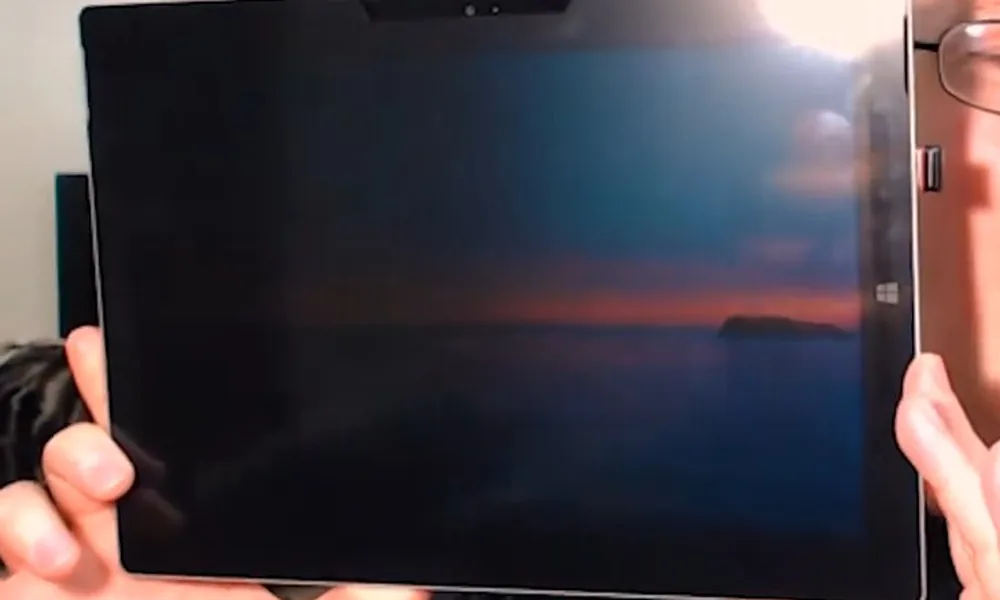
A privacy screen is a thin sheet of micro-louvre film: tiny vertical blinds built into plastic or glass. Looked at straight on, the picture looks normal. Looked at from an angle, the louvres block the light and the screen turns dark. The effect is physical, not digital, so it works with any application and any monitor, with no software or settings.
Two filters can look identical in the packet and behave very differently on your monitor, because the quality of the louvres, the clarity of the film, and the mounting decide whether you get clean privacy or a dim, hazy display. The laptop version is covered in our guide to the best privacy screens for laptops; here, everything is about the monitor itself, its size, its brightness, and the room it sits in.
Viewing Angles: 30 Degrees, 60 Degrees, and What They Mean
The viewing angle is the most important number on the box. A 30-degree screen starts to darken when someone looks from about 30 degrees off centre, roughly the angle of the colleague at the next desk. A 60-degree screen stays readable much further to the side, which suits a quiet room where the nearest person is a desk or two away. Narrower is more private, but it also darkens the display if you lean sideways or share your screen with someone beside you.
Two-way screens block the view from the left and right only, which covers the usual shoulder-surfing problem at a desk. Four-way screens also block the view from above and below, which matters when someone stands behind you or looks down from tiered seating. Four-way screens dim the display a little more, so two-way suits a standard office desk, and four-way suits healthcare, finance, and screens visible from a standing position.
The Best Monitor Privacy Screens Compared
| Type | Best For | Privacy Angle | Mounting | Brightness Loss | Price Band |
|---|---|---|---|---|---|
| Two-way hang-on | Shared desks, hot-desking | Left and right | Tabs over the top | 20 to 30 percent | Budget to mid |
| Two-way adhesive | Your own office monitor | Left and right | Sticks to the glass | 20 to 30 percent | Budget to mid |
| Four-way film | Healthcare, finance, reception | All four sides | Adhesive or hang-on | 30 to 40 percent | Mid |
| Magnetic glass | Daily on-and-off use | Left and right | Magnets on the bezel | 20 to 30 percent | High |
| Ultrawide filter | 34-inch 21:9 monitors | Left and right | Hang-on, wide span | 20 to 30 percent | Mid to high |
| Matte privacy film | Bright rooms, window desks | Left and right | Adhesive | 30 to 40 percent | Mid |
Sizing: Measure the Viewable Area, Not the Diagonal
The most common mistake is buying by diagonal size. A 27-inch monitor is not one size: the viewable width and height depend on the aspect ratio, and a 27-inch 16:9 panel measures differently from a 27-inch 16:10 panel. Measure the viewable width and height of the lit screen with a tape measure, and buy a filter that matches within a millimetre or two. A filter a few millimetres too wide lifts at the corners; one too small leaves a readable strip at the edge.
Aspect ratio matters just as much. Standard office monitors are 16:9, ultrawide monitors are 21:9, and older or specialist panels can be 16:10 or 32:9. Ultrawide and curved monitors need filters made for their exact curve and width, and a flat filter on a curved monitor will not sit properly at the edges. Dual-monitor setups need one filter per monitor, measured separately. Check the bezel too: thin bezels leave little room for hang-on tabs, and magnetic filters need a metal bezel to grip.
Brightness Loss on Desktop Monitors
Every privacy screen costs you brightness, and honest makers say so on the box. Most cut 20 to 40 percent of the light, so a monitor comfortable at half brightness may need three-quarters with a filter fitted. Desktop monitors are usually brighter, often 300 to 400 nits, and plugged into the wall, so running them brighter costs nothing.
Before you buy, check your monitor’s brightness rating and how bright you already run it. If you already run your monitor near maximum indoors, choose the lightest two-way film you can find, and avoid four-way and matte finishes, which dim the picture most. Remember that the dimming is the privacy: a filter that barely dims your display also barely hides it. Our guide to the best monitors of 2026 covers brightness and panel types, which helps if your current monitor is too dim for a filter.

Mounting Styles for Large Panels
Hang-on filters hook over the top of the monitor with small tabs that grip the bezel. They need no glue and no magnets, so they suit shared monitors, rented desks, and work monitors you do not own. Their weakness on a large panel is stability: a 27-inch or 32-inch filter is a big sheet, and a knock to the desk can shift it.
Adhesive filters stick directly to the display with a thin glue layer or reusable silicone adhesive, and they sit the flattest of all. Because the film touches the glass directly, there is no gap to catch dust and no edge to lift when you move the monitor. The downside is commitment: refitting one cleanly on a large panel is fiddly, and cheap adhesive can leave residue.
Magnetic filters clip onto the metal bezel with tiny magnets built into the frame, and they are the easiest to live with. You snap one on before a visitor arrives and pull it off at the end of the day in seconds, with no residue. The catch is that they need a magnetic bezel to grip, and many modern monitors have plastic or narrow bezels that will not hold one firmly.
Matte Versus Glossy, and the Open-Plan Office
Glossy privacy film keeps the picture sharp and the colours rich, which is what most people want for everyday work and video. Its weakness is reflection: in a bright room, a glossy screen mirrors the room behind you. Matte privacy film has a lightly frosted surface that scatters reflections instead of mirroring them, so the screen stays readable in bright light. The trade-off is a slight softening of the picture: text stays readable, but photos lose a little crispness.
In an open-plan office, the filter is only half the job. Position matters as much as the film. A monitor facing a walkway is visible to everyone passing, while a monitor angled into a corner is visible to almost nobody. Angle the monitor slightly away from the nearest walkway, and use the filter to cover the angle that remains. Pair it with a screen lock when you walk away, because a filter hides your display from people nearby and does nothing about the person who sits down at your unlocked desk.
Fitting a Monitor Filter Without Bubbles or Dust
Fitting is where most privacy screens fail, and it is almost always avoidable. Start in the cleanest room you have, and work with clean hands. Wipe the display with the cloth from the box, and use the dust-removal sticker to lift any last specks. A single speck of dust under an adhesive filter becomes a permanent bubble that no pressing will move.
Line the filter up with the top edge of the display first, using the webcam position as your guide where there is one, then lower it slowly while smoothing from the centre outward with a soft card. If a bubble appears, lift the nearest corner gently and lay the film down again rather than pressing harder. For hang-on filters, hook the top tabs first and check the corners sit flat. For magnetic filters, align the top edge and let the magnets catch.
Checklist: Before You Buy a Monitor Privacy Screen
- Measure the viewable width and height of your monitor, not the advertised diagonal, and check the aspect ratio.
- Decide two-way or four-way based on who can see your screen: neighbours beside you favour two-way, standing visitors four-way.
- Choose hang-on for shared or rented monitors, adhesive for a monitor you own, and magnetic only if your bezel is metal.
- Check your monitor can go bright enough to stay readable after a 20 to 40 percent brightness loss.
- Confirm the filter suits curved or ultrawide panels if yours is not a flat 16:9 monitor.
- Pick matte for bright rooms and glare, glossy for the sharpest picture and video work.
Frequently Asked Questions
Do monitor privacy screens work on curved monitors?
Yes, but only with a filter made for your exact curve and width. A flat filter on a curved monitor will not sit properly at the edges and will lift or leave gaps.
Will a privacy screen damage my monitor?
A good one will not, but cheap adhesive can leave residue when removed. Peel it off slowly from one corner and clean the display afterwards. For a delicate coating, a hang-on or magnetic filter is safest.
Can people still see my screen from directly behind me?
Yes, if they stand directly behind you and look straight at the display, a two-way screen will not hide it. Four-way screens also block the view from above and below, which helps when someone stands behind your desk.
Do I need one filter per monitor in a dual setup?
Yes. Each monitor needs its own filter, measured separately, because two supposedly identical monitors can differ by a few millimetres in viewable area.
Is a privacy screen better than a screen protector?
They do different jobs. A screen protector guards against scratches and drops, while a privacy screen hides the display from side views. Many privacy screens also guard against scratches, but they are not as tough as tempered glass. Our guide to the best screen protectors of 2026 covers scratch and drop protection.
How do I clean a monitor privacy screen?
Clean it as you would a display: a soft, lint-free cloth, slightly damp, wiped gently in one direction. Avoid paper towels, which can scratch the film, and never spray cleaner directly onto the filter.
The Bottom Line
A good monitor privacy screen is a small purchase that changes how freely you can work at a shared desk. Measure the viewable area, pick the viewing angle for the people around you, choose the mounting that suits a monitor you own or share, and make sure the panel is bright enough to stay readable through the filter. Fit it carefully, and your screen becomes yours again, even in the busiest office.


