The best baby monitors in 2026 do far more than show you a grainy picture of a sleeping baby. They give you a clear view in the dark, warn you when your baby stirs or cries, track breathing and movement while you sleep, and let you check in from your phone in seconds.
The best baby monitors share a few simple qualities: a sharp picture day and night, reliable alerts that only sound when something is actually happening, and a connection that never drops at 3 a.m. The differences that matter are the type of monitor, the video quality, and whether it connects over Wi-Fi or a private radio link. This guide cuts through the noise with honest, practical advice.
This guide compares the best baby monitors of 2026 across the types that matter most: dedicated video monitors, Wi-Fi app monitors, breathing and movement monitors, and simple audio monitors.
Key Takeaways
- A dedicated monitor with its own parent unit is the most reliable choice: no Wi-Fi, no app, no subscription.
- Wi-Fi monitors offer the best picture and remote viewing, but need a strong home network and good security.
- Night vision matters more than daytime video quality, because most checks happen in the dark.
- Breathing and movement monitors add real reassurance, but they are not medical devices.
- Check whether video history or smart alerts need a monthly subscription before you buy.
What Makes a Great Baby Monitor
A baby monitor has one job: to tell you quickly and reliably when your baby needs you. The picture is the first thing to check. Look for at least 1080p video on Wi-Fi monitors and a clear 720p screen on dedicated units, because anything less turns your baby into a blurry shape.
Range and battery life decide whether the monitor works in your real home. A dedicated monitor should reach through two or three walls and at least one floor, with a parent unit battery that lasts a full night on a single charge. Wi-Fi monitors have no range limit at all, because they work anywhere your phone has internet, but they are only as good as your home network.
Video Quality and Night Vision
Night vision is the feature you will use most, because most baby checks happen in the dark. Infrared night vision turns the nursery into a clear black-and-white picture, and the best systems show your baby sharply enough to see breathing movements. Whatever the technology, test the night picture before you rely on it: a good monitor shows the whole cot clearly, not just a bright circle in the middle.
Wi-Fi Monitors vs Dedicated Monitors
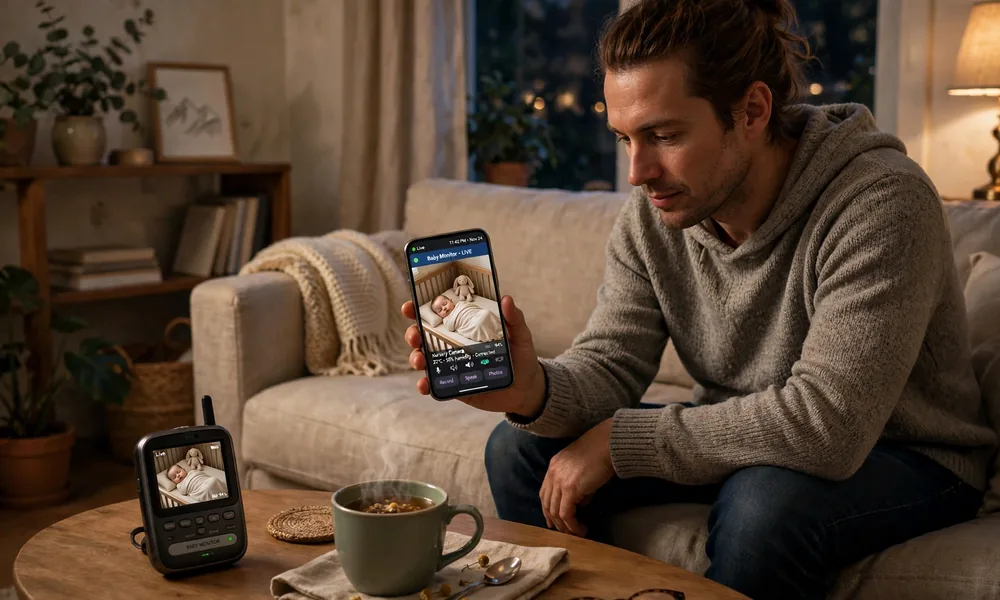
The biggest choice is between a Wi-Fi monitor and a dedicated monitor, and it shapes everything else. A dedicated monitor uses a private radio link between the camera and its own parent unit. It works without internet, cannot be hacked remotely, and never asks for a subscription. A Wi-Fi monitor connects to your home network and streams to an app on your phone. It gives you a sharper picture, lets you check in from anywhere, and often adds smart alerts for crying, movement and room temperature.
Best Video Baby Monitors in 2026
Video monitors are the default choice for most parents, and the 2026 models are genuinely better than the ones from a few years ago. Cameras are smaller, pictures are sharper, and setup is simpler. A pan-and-tilt camera lets you follow your baby around the cot from the parent unit or the app, which matters once your baby starts rolling and crawling. Smart alerts tell you when crying starts, when movement stops, or when the room gets too hot or cold.

Pan-and-Tilt Cameras
A pan-and-tilt camera is worth the small extra cost once your baby becomes mobile. A fixed camera shows one corner of the cot, and the moment your baby rolls to the other side, you are watching an empty mattress. A pan-and-tilt camera follows your baby with a swipe on the screen, and the best models also zoom, so you can check breathing closely without waking anyone.
Two-Way Audio and Lullabies
Two-way audio lets you talk to your baby from another room, and it is more useful than it sounds. A familiar voice often settles a baby who has woken briefly, saving you a trip down the hall. The best systems have a clear speaker and a sensitive microphone, with minimal delay, so your baby hears you properly. Built-in lullabies and white noise are a welcome bonus: a gentle lullaby or a soft shushing sound can help your baby drift back to sleep, and you can switch it on from the parent unit or the app without entering the room.
Breathing and Movement Monitors
Breathing and movement monitors are the fastest-growing type of baby monitor, and they answer the worry that keeps most new parents awake: is my baby breathing normally? There are two kinds. Sensor pads sit under the mattress and detect the tiny movements of breathing, sounding an alarm if no movement is detected for twenty seconds. Wearable monitors clip to a nappy or a sock and track breathing, movement and sometimes oxygen levels, sending the data to a parent unit or a phone app.
Both types give real reassurance, especially in the first six months, but it is important to understand their limits. They are not medical devices, and they cannot prevent sudden infant death syndrome. What they do is alert you quickly if breathing pauses, which gives you time to act.
Sensor Pads Under the Mattress
Sensor pads are the simplest breathing monitors. A thin pad slides under the cot mattress and connects to a small control unit, which watches for movement and sounds a loud alarm if it stops. There is nothing attached to your baby, nothing to charge, and nothing to remember at bedtime, which is why many parents prefer them. The catch is that they only work while your baby is lying on the pad, so they are less useful once your baby starts rolling around the cot.
Wearable Breathing Monitors
Wearable monitors track your baby wherever they sleep, because the sensor travels with them. A small clip or sock sensor measures breathing movements and, on some models, heart rate and oxygen saturation, sending the readings to your phone. The data is fascinating, and the alerts are fast, but wearables need charging, they need to fit properly, and they can come loose during the night.
Audio Monitors and Budget Options
Not every parent needs video. A good audio monitor is cheaper, simpler, and often all you need, especially if your baby sleeps in the next room. Modern audio monitors use digital radio links with almost no interference, clear sound, and a range that covers most homes. Some add a simple temperature display or a night light. The best audio monitors also include two-way talk-back, so you can soothe your baby with your voice.
If your budget is tight, spend it on sound quality and range rather than on a screen. A clear audio monitor that never drops its connection beats a cheap video monitor with a blurry picture and a battery that dies at midnight.
Safety, Privacy and Safe Sleep
Baby monitors sit in the most private room in your home, so safety and privacy deserve real attention. For Wi-Fi monitors, change the default password immediately, use two-factor authentication if the app offers it, and keep the firmware updated. For any monitor, keep cords and cables well away from the cot, mount the camera securely so it cannot fall, and never place a camera inside the cot.
Safe sleep matters more than any monitor. Always place your baby on their back on a firm, flat mattress with no pillows, blankets or soft toys in the cot.

Best Baby Monitors Compared
| Monitor Type | Best For | Typical Price | Key Strength |
|---|---|---|---|
| Dedicated video | Reliability, privacy | £80–£180 | Works without Wi-Fi |
| Wi-Fi video | Remote viewing, best picture | £100–£250 | Check in from anywhere |
| Sensor pad | Breathing reassurance | £90–£160 | Nothing worn by baby |
| Wearable breathing | Detailed sleep data | £200–£300 | Tracks baby anywhere |
| Audio only | Budget, simplicity | £30–£70 | Clear sound, long battery |
| Pan-and-tilt video | Mobile babies | £120–£220 | Follows baby around cot |
Baby Monitor Buying Checklist
- Decide Wi-Fi or dedicated first: remote viewing and picture versus privacy and reliability.
- Check the night vision picture in person or in a trusted review before you buy.
- Test the Wi-Fi signal in the nursery if you are choosing a Wi-Fi monitor.
- Ask whether smart alerts and video history need a monthly subscription.
- Check the parent unit battery lasts a full night, or that the app runs quietly in the background.
- Keep all cords, cables and the camera mount well away from the cot.
Frequently Asked Questions
What is the best baby monitor for newborns?
A dedicated video monitor with a sensor pad is the best combination for newborns. The video monitor lets you see and hear your baby clearly, and the sensor pad adds breathing reassurance in the first months.
Are Wi-Fi baby monitors safe from hackers?
Wi-Fi baby monitors are safe when they are set up properly. Change the default password, use a strong unique password, enable two-factor authentication, and keep the firmware updated. If security worries you, a dedicated monitor with a private radio link cannot be accessed over the internet at all.
Do I need a breathing monitor for my baby?
You do not need a breathing monitor, but many parents find the reassurance worth the cost. Breathing monitors alert you if movement stops, which helps you respond quickly, but they are not medical devices and they cannot prevent sudden infant death syndrome.
How far can a baby monitor reach?
A dedicated monitor typically reaches 200 to 300 metres in open air, but walls and floors reduce that to one or two rooms in a real home. A Wi-Fi monitor has no range limit, because it works anywhere your phone has internet, so it is the better choice for large homes or for checking in while you are out. For the nursery itself, our guide to the best nursery essentials for 2026 covers everything else your baby’s room needs.
Can I use a pet camera as a baby monitor?
A pet camera is not a good substitute for a baby monitor. Pet cameras are built for watching animals while you are out: they focus on barking alerts, treat dispensers and wide rooms, not on the quiet breathing, temperature and safe-sleep needs of a nursery. If you want to compare camera technology, our guide to the best pet cameras of 2026 shows how the two differ.
Do baby monitors need a subscription?
It depends on the model. Dedicated monitors never need a subscription. Wi-Fi monitors usually work for free for live viewing, but many charge a monthly fee for video history, smart alerts and cloud storage, typically £3 to £10 a month. A strong home network also matters: our guide to the best routers of 2026 will help if your nursery Wi-Fi is weak.
The Bottom Line
The best baby monitors in 2026 are the ones that match your home, your habits and your worries. A dedicated video monitor is the most reliable and private choice, a Wi-Fi monitor gives you the sharpest picture and remote viewing, and a breathing monitor adds real reassurance in the first months. Whatever you choose, prioritise night vision, reliable alerts and a connection that never drops, and check the subscription cost before you buy. Start with the type that fits your home, then compare two or three models side by side before you decide.