
An office desk should fit your work, your body and your room, and most people get only one of the three right. They buy a desk that looks good in a photo and discover, a month later, that the monitor sits too low and their shoulders ache by lunch.
The right desk disappears into your working day: it holds your screen at eye level, leaves room for the way you work, and fits the room without blocking the door. This guide covers the sizes, shapes and features that matter.
Key Takeaways
- Measure your gear first, then the desk: a single monitor needs about 120 centimetres of width, dual monitors need 140 to 160 centimetres.
- Standard desk height is 73 to 76 centimetres, but your chair, your height and your screen decide whether that height works for you.
- An L-shaped desk suits corner rooms and heavy multitaskers, while a compact straight desk suits small rooms and laptop-only work.
- Check stability before you buy: a desk that wobbles when you type will annoy you every day, whatever it cost.
- Plan for cables, storage and a monitor position now, because adding them later is always messier and more expensive.
Start With How You Actually Work
Before you look at a single desk, watch yourself work for a week. Do you write on paper beside a laptop, or live on two screens? A writer needs depth for paper; a designer needs width for a tablet and a second screen; a video caller needs a surface that does not shake when they type.
Count the gear, too. A laptop, a monitor, a keyboard, a mouse, a lamp and a notebook fill a 120-centimetre desk completely. Add a second monitor or a printer, and you need 160 centimetres or an L-shape. Leave a handspan of empty desk; a surface with no free space fights you.
The Main Types of Office Desk
Every office desk is a trade between space, storage and flexibility. The types below cover almost every home worker, and the right one follows from your room and your routine.
Straight desks
Straight desks are the simple rectangle most people picture. They fit against any wall, come in every size from 100 to 200 centimetres, and cost less than shaped desks. A 140-centimetre straight desk suits one monitor and a laptop side by side. The trade-off is surface: everything sits in one line, so a second monitor quickly eats the free space.
L-shaped and corner desks
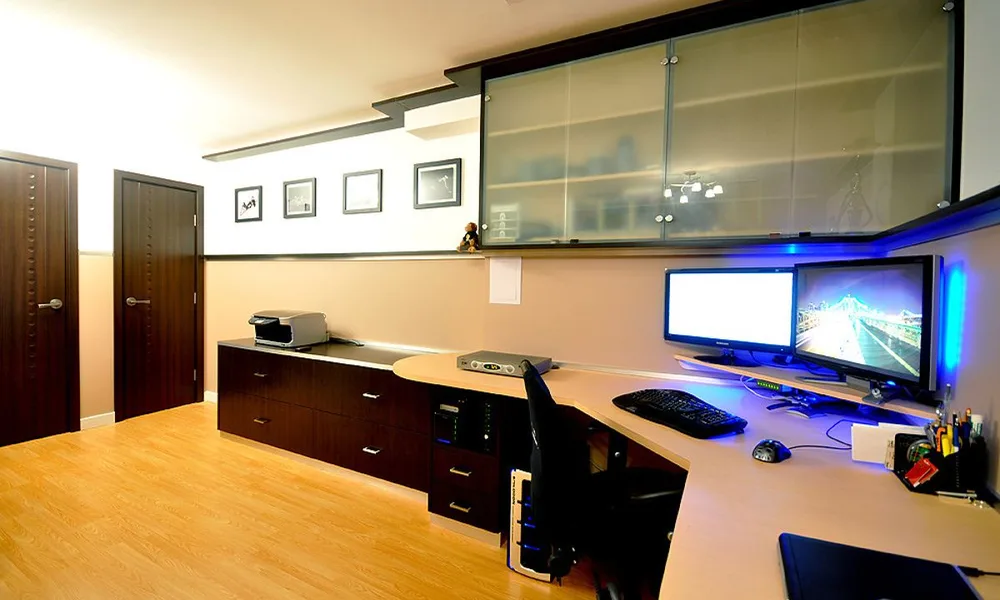
L-shaped desks turn a corner into two workstations: one side for the screen, one side for paper or a second device. They suit heavy multitaskers and rooms with a dead corner. The trade-off is footprint: an L-shape needs about 150 by 150 centimetres, and it is hard to move later.
Compact and folding desks
Compact desks, from 80 to 120 centimetres wide, suit spare bedrooms, hallway nooks and laptop-only work. The trade-off is stability and storage: small desks wobble more, hold less, and leave no room for a monitor arm. They suit light, short sessions better than full working days.
Standing desks
Standing desks rise and fall at the touch of a button, so you can alternate sitting and standing. They suit people with back trouble and tall users. The trade-off is price: a good electric frame costs more than a fixed desk and needs a power socket. If you are considering one, our guide to the best standing desks of 2026 compares the models worth standing at, judged on stability at full height, lift quality and weight capacity.
Writing desks
Writing desks are slim, simple tables with little or no storage, built for pen, paper and a laptop. They suit bedrooms and living-room corners. The trade-off is practicality: no drawers, no cable management, and rarely enough depth for a large monitor.

Office Desks Compared
| Type | Width | Best for | Storage | Watch out for |
|---|---|---|---|---|
| Straight | 100 to 200 cm | Most home workers | Drawers optional | Surface fills fast |
| L-shaped | 150 by 150 cm | Multitaskers, corners | Good | Large footprint, hard to move |
| Compact | 80 to 120 cm | Small rooms, laptops | Little or none | Wobble, no monitor room |
| Standing | 120 to 180 cm | Back trouble, tall users | Varies | Price, needs power |
| Writing | 100 to 140 cm | Writing, light work | None | No cables, no drawers |
Getting the Size Right
Size is where most office desks go wrong, and a tape measure settles it in five minutes. Width first: a single monitor needs about 120 centimetres, dual monitors need 140 to 160. Depth matters too: 60 centimetres is the minimum for a monitor, keyboard and forearms, while 80 lets you push the screen back and still write.
Then measure the room. Leave at least 90 centimetres behind the chair, and check the desk does not block a door or a radiator. Tape the outline on the floor and sit in the chair: a desk that looks compact in a shop often dominates a spare bedroom.
Height, Ergonomics and Your Chair
A desk is only half of a workstation; the chair is the other half. Standard desk height is 73 to 76 centimetres, suiting most adults in an adjustable chair with feet flat on the floor. If you are tall, a fixed desk forces you to hunch; if you are short, it leaves your feet dangling. An adjustable-height desk solves this without a new chair.
The screen decides the rest: the top of your monitor should sit at or just below eye level, about an arm’s length away. Our guide to the best and worst office chairs of 2026 covers the chairs that hold your back through a full day, because a good desk with a bad chair still ends in a sore neck. Test the desk and the chair together, and raise the monitor on a stand if the height is wrong.
Materials and Build Quality
Material decides how the desk ages. Solid wood is the most forgiving: it takes knocks and scratches sand out. Laminate over chipboard is the budget choice: it resists coffee rings, but it chips at the edges and sags under a heavy monitor. Metal frames with a wood top are the sturdy middle ground.
Build quality shows in the details: a frame that does not flex when you lean on a corner, drawers that run smoothly when loaded, and a rounded front edge that will not cut into your wrists. Check the weight rating for dual monitors on arms: a thin top can bow. The desk should feel solid when you type hard on it.
Colour and finish are practical choices, not just style. A pale top reflects light and makes a small room feel bigger, but it shows coffee rings and pen marks. A dark top hides marks and looks smart on video calls, yet it shows dust and can make a dim room feel smaller. A mid-tone wood works in most rooms, and a matte finish beats gloss, because gloss glares under a desk lamp and shows every fingerprint.
Storage, Cables and the Gear on Top
A desk without a plan for cables becomes a tangle within a week. Look for a cable tray or a grommet hole, and route the monitor, laptop and lamp cables through one channel. Keep the power strip where you can reach its switch, so you never kick a plug loose during a call.
Storage depends on your work: two drawers hold stationery, a pedestal holds files and a printer. But drawers eat legroom, so a full pedestal suits wide desks better than compact ones. A monitor arm frees the desk surface and fixes the screen height, and our guide to the monitor arms that fix your posture covers the arms that hold a screen steady without wobbling. Buy the arm with the desk, not after, so the weight and the mounting match.
Where the desk sits in the room matters as much as the desk itself. A desk facing a window gives you daylight but puts glare on the screen, so sit side-on to the window when you can. A desk against a wall keeps cables tidy and the room open, while a desk facing into the room suits video calls, because the background is a wall rather than a bed. Try the position for a day before you fix the desk to the wall or drill a cable hole.
What to Check Before You Buy
Before you pay, run the checks showrooms hope you will skip. Sit at the desk, type for a minute, and feel for wobble. Push down on a front corner: a stable desk barely moves. Open every drawer fully; cheap runners sag. Look underneath: a steel crossbar adds real stiffness, while a desk held by a few cam locks will loosen within a year.
Ask about assembly and returns: a desk that takes three hours to build is a weekend lost, and one that cannot be returned once assembled is a risk. Check the guarantee on the frame and the moving parts, especially for standing desks. The desk that fits on paper is not always the desk that fits your room.
Checklist: Before You Buy an Office Desk
- List your gear and measure it: one monitor needs 120 centimetres, dual monitors need 140 to 160.
- Measure the room and tape the desk outline on the floor, leaving 90 centimetres behind the chair.
- Check the depth: 60 centimetres minimum, 80 centimetres if you write on paper beside a monitor.
- Test stability: type hard, push a front corner, and open the drawers fully before you pay.
- Match the desk to your chair and your height, and plan the monitor position at eye level.
- Plan cables and storage now: a tray, a grommet and a monitor arm cost less bought with the desk.
Frequently Asked Questions
What size desk do I need for two monitors?
Dual monitors need a desk 140 to 160 centimetres wide and at least 60 centimetres deep. A monitor arm helps, freeing the surface and letting you set each screen at the right height.
How deep should an office desk be?
Sixty centimetres is the minimum for a monitor, keyboard and forearms. Eighty centimetres is better if you write on paper, use a drawing tablet, or want the screen further back. Anything under 50 centimetres suits a laptop only.
What is the best desk height for working?
Standard desk height is 73 to 76 centimetres, which suits most adults in an adjustable chair. If you are tall or short, an adjustable-height desk or a desk with adjustable feet is worth it, because a fixed height cannot be corrected later.
Are L-shaped desks better than straight desks?
L-shaped desks suit corners and heavy multitaskers. Straight desks suit most people better: they fit any wall, cost less, and move easily. Choose the L-shape only if you have a real corner and need the second surface.
Do I need a standing desk?
A standing desk helps if you get stiff after hours of sitting, or if you are tall. It is not essential for everyone: a good chair, a screen at eye level and regular breaks matter more than standing itself.
How do I stop my desk from wobbling?
Buy a desk with a steel frame or a crossbar, and tighten every fixing after assembly. A wobble often comes from uneven feet, so adjustable feet help. If a desk wobbles in the shop, it will wobble at home.
The Bottom Line
The right office desk fits your gear, your body and your room at the same time. Measure your monitors before you measure the wall, test stability with your own hands, and plan the cables and the chair with the desk. Get those right, and the desk becomes the quiet base of a working day that feels easy in 2026.


