The power strip under your desk is the ugliest part of an otherwise tidy room. Six plugs, three chunky adapters, a nest of black cords spilling across the floor, dust gathering in the tangle. A cable management box is the simplest fix for that one problem: a lidded box that hides the strip and its plugs inside, with slots at each end so only the cables you need come out. It does not route your cords, label them, or hold them to the wall. It does one job, and when it is sized right, it does it quietly for years.
Key Takeaways
Measure your power strip first, including every adapter you plan to plug in, then add at least five centimetres of length and three of width. A box that fits the strip but not the adapters is useless. Choose a box with ventilation slots on the sides or lid, and never seal a strip inside a solid box. Plastic suits most desks and budgets; wood suits living rooms where the box stays visible; bamboo and fabric suit light loads only. Put the box where you can reach the switch without moving furniture. Keep the strip’s load under its rated limit, and check that nothing inside feels hot after an hour of normal use.
Cable Management Boxes 2026 at a Glance
| Box type | Best for | Strip size | Material | Price |
|---|---|---|---|---|
| Small plastic box | One strip, 4–5 plugs | Up to 30 cm | Plastic | Budget |
| Large plastic box | Strip plus bulky adapters | 32–42 cm | Plastic | Budget to mid-range |
| Wooden box | Living rooms, visible spots | 30–40 cm | Wood | Mid-range |
| Bamboo box | Light loads, bedrooms | Up to 32 cm | Bamboo | Mid-range |
| Two-tier box | Two strips or a strip plus router | Two strips | Plastic or wood | Mid-range to premium |
| Wall-mountable box | Off the floor, pet-proofing | Up to 38 cm | Plastic | Mid-range |
What a Cable Management Box Is Really For
A cable management box hides a power strip. That is the whole job. The strip, its plugs, and its adapters sit inside; the lid closes over them; cables leave through slots cut into the ends or the back. The visible result is a clean box instead of a tangle, and the practical result is that dust, feet, and pets stop reaching the plugs. It also stops the slow damage of cables being kicked and bent at the plug, which is how chargers fail.
What it is not for matters just as much. A box does not organise the cables running to your monitor, lamp, and speakers. Those need clips, a tray, or a sleeve, and the broader cable management guide covers that full system, from mapping your routes to choosing between trays and raceways. Think of the box as one room in a tidy setup, not the whole house: it handles the strip, and other tools handle the runs.
Getting the Size Right
Start with the strip, not the box. Lay the strip flat, plug in every adapter you intend to use, and measure the full length from the first plug to the last, including any adapter that sticks out past the strip’s end. Then measure the width across the widest adapter. Most people underestimate this step by a wide margin: a strip that measures 28 centimetres empty can measure 38 once two laptop bricks and a chunky phone charger are plugged in.
Add at least five centimetres to the length and three to the width. That spare room is not luxury; it is what lets you plug and unplug things without forcing them, and it leaves air around the adapters. A box packed tight runs hotter and is harder to use, so a slightly oversized box beats a snug one every time. If your strip is already close to the largest standard box, look at two-tier boxes or split the load across two strips in two boxes.

The Main Types of Cable Management Box
Small plastic boxes are the default, and for a single strip with four or five plugs they are the right choice. They are light, cheap, easy to clean, and available in white, black, and grey to match most rooms. Their weakness is the lid: cheap ones flex, rattle, or refuse to sit flat once a cable presses against them. Check the lid fit in reviews before you buy, and prefer a box with a latch or a weighted lid.
Large plastic boxes are the same idea scaled up for strips with bulky adapters, and they are the type most home offices actually need. The extra length holds a six-socket strip plus two laptop bricks, and the wider end slots pass thick cables without pinching them. If you are unsure between sizes, buy large; the price difference is small, and the spare room is useful the first time you add a device.
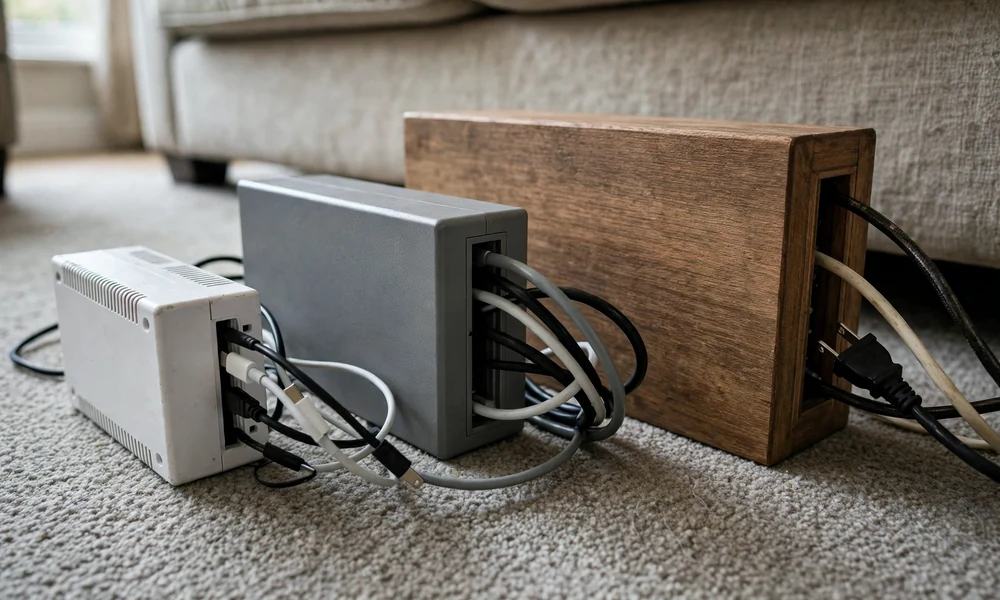
Wooden boxes suit rooms where the box stays visible, such as a living room or a bedroom. A walnut or oak-finish box beside a television stand looks like furniture rather than a plastic tub, and the heavier lid stays put. Wood is less forgiving of heat than plastic, so check that the box has ventilation slots and keep the load modest. A wooden box with a solid, unvented lid is a bad buy no matter how good it looks.
Two-tier boxes hold two strips, or a strip plus a small router or hub, on separate levels. They suit the corner where the television, console, and internet gear all meet, and they keep the router’s cables away from the power strip’s heat. They are bigger and heavier, so measure the floor space as well as the strip, and make sure you can reach both tiers without pulling the whole box out.
Wall-mountable boxes screw to the wall or the back of a desk, keeping the strip off the floor entirely. They are the best choice when pets chew cables, when a vacuum cleaner keeps hitting the box, or when floor space is tight. Mounting takes a few minutes and two screws, but it pays off every time you clean: nothing to move, nothing to trip over, and the cables drop straight down from the slots.
Boxes are one family among several, and the choice between a box, a tray, a sleeve, or a set of clips depends on where your mess actually lives. The cable organizer guide compares those families side by side, with the setups each one suits best. If your cables dangle from the desk as well as bunch at the strip, read that comparison before you decide; a box plus a tray is a common pairing.
Materials and Build Quality
Plastic is the practical default. Good plastic is thick enough not to flex when you press the lid, smooth enough to wipe clean, and heat-resistant enough to sit near warm adapters without warping. Cheap thin plastic goes cloudy, cracks at the slot corners, and smells faintly of chemicals when it warms up. If the listing does not name the plastic type, treat that as a warning and look for reviews that mention the lid after a month of use.
Wood brings weight and looks, and a well-made wooden box will outlast several plastic ones. Check the joints: dovetail or dowel joints hold, while glued butt joints open up when the box warms and cools through the seasons. Check the finish inside as well as outside, because a rough interior snags cables and sheds splinters onto plugs. A wooden box should feel solid when you lift it by the lid.
Ventilation and Heat
Power bricks get warm in normal use, and a closed box traps that warmth. Every box you buy should have ventilation slots on the sides, the lid, or both, and the slots should be open, not decorative grooves that stop short of going through. Hold the box up to the light: if you cannot see through the slots, they are not vents.
Placement: Where the Box Should Live
Reach matters more than hiding. You need the switch, and you need to plug things in and out without moving furniture. A box buried behind a heavy bookcase will be used once and then ignored, and an ignored box becomes a dust trap. Put it where your hand can reach the lid in a second, even if that means it is slightly more visible.
Matching the Box to the Room
In a living room, the box is usually visible, so looks matter. A wooden or dark plastic box that matches the television stand will disappear; a bright white box against a dark floor will draw the eye. Match the box to the furniture near it, not to the wall, and keep the cables leaving the slots in one direction, toward the television, so the eye follows them instead of noticing the box.
On a small desk, every centimetre counts, and a box can feel like a luxury you cannot afford. A slim box tucked behind the monitor, or a wall-mounted box under the desk, can work, but sometimes the better answer is a tray plus clips and no box at all. The desk organizers for small desks guide covers that trade-off in detail, including the risers, trays, and pockets that free space instead of taking it.
Common Mistakes to Avoid
Another mistake is hiding the box so well you cannot reach it. The switch, the spare socket, and the charger you unplug every night all need to be within easy reach. A box behind a bookcase is a box you will stop opening, and a box you stop opening is a box that quietly fills with dust and heat.

Frequently Asked Questions
Are cable management boxes safe? Yes, when used sensibly. Choose a box with ventilation slots, do not overload the strip inside it, and keep the box accessible so you can reach the switch. Never hide a strip that feels hot, and keep high-draw appliances such as heaters on a wall socket instead.
What size cable management box do I need? Measure your power strip with every adapter plugged in, then add at least five centimetres of length and three of width. Most home office setups need a large box of 32 to 42 centimetres; a single strip with slim plugs fits a small box of up to 30 centimetres.
Do cable management boxes work for television setups? Yes, they suit television corners well, because the strip behind a television stand is often the messiest one in the house. A large or two-tier box holds the television, console, and router strips together, and a wooden box blends in with the stand. Keep the box where you can reach the switch without moving the stand.
The Bottom Line
A cable management box is a small purchase that fixes a visible, daily annoyance: the tangle of plugs behind the desk or the television. Buy it after measuring, not before; give the adapters room and air; put it where you can reach the switch; and keep spare cables out of it. Do those four things and the box will disappear into the room, which is exactly what it is for. The strip stays hidden, the plugs stay safe, and the floor finally looks like the rest of the room.