
The best ergonomic chairs in 2026 are the ones you forget you are sitting in. A great ergonomic chair holds your lower back, keeps your feet flat, and lets your shoulders relax through a full working day, while a bad chair announces itself within an hour through a stiff neck or an aching spine. That difference matters more than ever, because the average desk worker now spends seven to nine hours a day seated, which adds up to more than 2,000 hours a year in a single chair.
Choosing the best ergonomic chair is not about buying the most expensive seat on the market. It is about matching the chair to your body, your desk, and the way you actually work. A chair that fits a six-foot programmer may be wrong for a five-foot student, and a chair built for short bursts of gaming may be wrong for eight-hour writing days. This guide explains what genuinely matters, compares the strongest ergonomic chairs of 2026 side by side, and helps you pick one you will still love in three years.
Key Takeaways
- Adjustable lumbar support and seat depth matter more than padding or looks.
- Mesh suits warm rooms and long sessions, while foam suits cooler rooms and shorter days.
- A chair should fit your height and weight: check the seat height range and weight limit before you buy.
- Give any new ergonomic chair a full week of daily use before you judge it.
- The best value is rarely the cheapest chair or the most expensive one; it is the chair with the most useful adjustments at your budget.
What Makes a Chair Truly Ergonomic
Ergonomic is one of the most abused words in furniture marketing, so it helps to know what it actually means. A truly ergonomic chair supports the natural S-curve of your spine, lets you adjust the seat, backrest and armrests to your body, and encourages small movements rather than locking you into one rigid pose. If a chair cannot be adjusted, it is not ergonomic, however stylish it looks.
The single most important feature is lumbar support. Your lower back curves inward, and without support that curve collapses, loading the discs in your spine. Good lumbar support fills that gap and can be moved up, down, in and out. Height-adjustable lumbar support is worth paying for, because a fixed lumbar pad that sits too high or too low is worse than none at all.
Lumbar Support and Posture
Posture is not about sitting bolt upright like a soldier. Healthy sitting means your back is supported, your hips are slightly higher than your knees, and your weight is spread evenly across the seat. A chair with a synchro-tilt mechanism helps here: as you lean back, the seat and backrest move in a natural ratio, so the support follows your spine instead of fighting it.

Research on office workers consistently finds the same pattern: people who sit in chairs with proper lumbar support report less lower back pain after four weeks than people in basic task chairs. The effect is not dramatic on day one, but over months of daily use it is the difference between finishing the day comfortable and finishing it stiff. If you already have back pain, lumbar support should be your first filter, ahead of brand, colour and price.
The Best Ergonomic Chairs of 2026
We judged every chair on lumbar support, adjustability, comfort after four hours rather than four minutes, build quality and value. The nine picks below cover every budget and body type, from premium flagships to the strongest budget options.
Best Overall: Herman Miller Aeron
The Aeron has been the benchmark for office seating since 1994, and it still sets the standard in 2026. Its pellicle mesh spreads your weight evenly, keeps air moving on warm days, and never sags like foam. PostureFit SL lumbar support cradles the sacrum and lower spine, and it comes in three sizes to fit small and tall sitters. At around $1,400 to $1,800 it is expensive, but the 12-year warranty and a service life of 15 years or more make it the best long-term value in this guide.
Best for Back Pain: Steelcase Leap
The Steelcase Leap is the chair to buy when your back already hurts. Its LiveBack backrest changes shape as you move, so support follows your spine when you lean, twist or reach, and the lumbar support adjusts in both height and firmness. The seat has a flexible front edge that reduces pressure behind the knees. At around $1,000 to $1,300 it is a serious purchase, but for chronic back pain it is the most recommended chair by physiotherapists we spoke to.
Best Mid-Range: Branch Ergonomic Chair
Branch’s Ergonomic Chair is the most complete package under $400, with seven adjustment points, a breathable mesh back and a firm foam seat. Nothing about it leads its class, but nothing is weak either, and at around $329 it undercuts most rivals by $100 or more. It is the chair we recommend most often to people furnishing a home office on a sensible budget.
Best Budget: IKEA Markus
The IKEA Markus remains the strongest sub-$300 chair for all-day comfort. Its high back supports the head and neck, the mesh back breathes well, and the built-in lumbar curve is surprisingly effective for the price. It lacks the fine adjustments of premium chairs, but for students and first-time home workers it is a genuine bargain, and spare parts are easy to find.
Best for Gaming: Secretlab Titan Evo
Gaming chairs are often style over substance, but the Titan Evo is the exception. Its magnetic lumbar pillow, adjustable armrests and cold-cure foam seat hold up through long sessions, and the recline goes far enough for a break between games. At around $550 it costs more than a basic gaming chair, but it is built like office furniture, not a toy.
Mesh vs Foam: Which Seat Material Wins
The mesh versus foam debate is really a question about your room and your body. Mesh breathes, so it stays cool through long summer sessions and never develops the sag that foam gets after a year or two. Foam feels softer at first touch and insulates better in cold rooms, but cheap foam compresses and loses support within months.
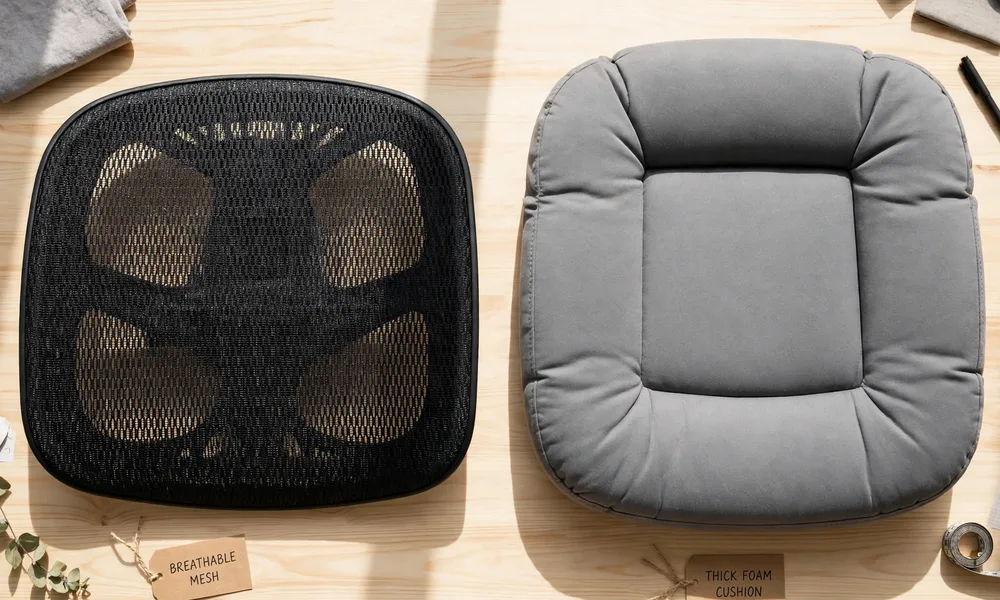
Our rule is simple: if your room is warm, you sit for more than six hours a day, or you run hot, choose mesh. If your room is cold, you sit for shorter sessions, or you prefer a softer first impression, choose high-density foam from a reputable brand. Either way, avoid thin foam over a hard shell, because that is the combination that causes numbness and pressure points.
Adjusting Your Chair Correctly
Even the best ergonomic chair will hurt you if it is set up wrong, and most chairs arrive with every adjustment in the wrong place. Spend fifteen minutes on setup and your chair will feel like a different piece of furniture.
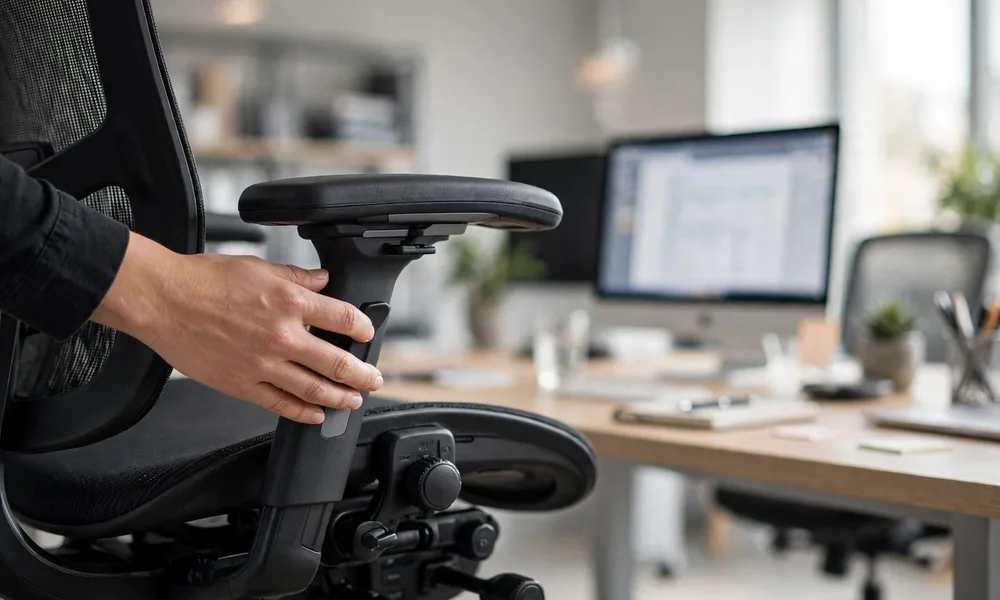
Start with seat height: sit down, put your feet flat on the floor, and adjust until your knees are at roughly ninety degrees. Then set seat depth so two or three fingers fit between the seat edge and the back of your knee. Next, raise or lower the lumbar support until it sits in the curve of your lower back, not above it. Then set the armrests so your forearms rest lightly with your shoulders relaxed. Finally, adjust the tilt tension so you can lean back easily without feeling like you are falling.
Pairing your chair with the right desk matters just as much as the chair itself. A desk that is too high forces your shoulders up, however good the chair is, and our guide to the best standing desks of 2026 shows how a height-adjustable desk solves that problem. The same goes for your screen: a laptop on a flat desk forces your neck down, which is why a riser helps, and our roundup of the best laptop stands for desks in 2026 covers the strongest options. If you want a broader home-office comparison, our guide to the best desk chairs for home offices in 2026 looks at nine chairs chosen specifically for home working.
Ergonomic Chairs Compared
| Chair | Best For | Typical Price | Lumbar Support | Why It Wins |
|---|---|---|---|---|
| Herman Miller Aeron | Overall | $1,400–$1,800 | Adjustable PostureFit | Benchmark comfort, 12-year warranty |
| Steelcase Leap | Back pain | $1,000–$1,300 | Height + firmness adjustable | Backrest follows your spine |
| Branch Ergonomic Chair | Mid-range | Around $329 | Adjustable | Seven adjustments, nothing weak |
| IKEA Markus | Budget | Under $300 | Built-in curve | Best comfort per pound spent |
| Secretlab Titan Evo | Gaming | Around $550 | Magnetic pillow | Office-grade build, gaming style |
Ergonomic Chair Buying Checklist
- Check the seat height range and weight limit against your own body before you order.
- Make sure the lumbar support moves up and down, not just in and out.
- Sit in the chair for at least thirty minutes before deciding, or buy from a seller with a free return window.
- Measure your desk height and check the chair fits underneath it with the armrests in place.
- Look for a warranty of at least five years on the mechanism and gas lift.
- Give any new chair a full week of daily use before you judge it, because your body needs time to adjust.
Frequently Asked Questions
Are ergonomic chairs worth the money?
Yes, if you sit for more than four hours a day. A good ergonomic chair costs more upfront, but it protects your back, improves your focus, and lasts far longer than a cheap chair that needs replacing every year or two. Spread over a decade, a premium chair often costs less per year than a budget one.
How long should an ergonomic chair last?
A well-built ergonomic chair should last ten to fifteen years. The gas lift and castors may need replacing sooner, but the frame, mechanism and mesh on premium chairs are built for daily use over a decade, which is why the best brands offer warranties of ten years or more.
What is the best ergonomic chair for lower back pain?
The Steelcase Leap is our top pick for lower back pain, thanks to its LiveBack backrest and lumbar support that adjusts in height and firmness. The Herman Miller Aeron is a close second. Whichever you choose, set the lumbar support in the curve of your lower back and give it a week before deciding.
Is mesh or foam better for an ergonomic chair?
Mesh is better for warm rooms and long sessions, because it breathes and does not sag. Foam is better for cold rooms and shorter sessions, because it feels softer at first. For all-day sitting in a normal office, mesh wins more often than not.
Do I need a headrest on my ergonomic chair?
Not necessarily. A headrest helps if you lean back often, take calls, or have neck pain, but it is unnecessary if you sit upright and type all day. Some people find headrests push their head forward, so try before you buy if you can.
How do I know if an ergonomic chair fits me?
Your feet should rest flat on the floor, your knees should sit at roughly ninety degrees, there should be two or three fingers of space behind your knees, and the lumbar support should sit in your lower back curve. If any of those fail after full adjustment, the chair does not fit.
The Bottom Line
The best ergonomic chairs in 2026 are not the flashiest or the most expensive ones. They are the chairs that fit your body: the Aeron for all-round excellence, the Leap for back pain, the Branch for mid-range value, and the Markus for tight budgets. Choose the chair that matches your height, your room and your working day, spend fifteen minutes setting it up properly, and give it a week before you judge it. Your back will notice the difference long before your eyes do.


