The Best Charging Cables of 2026 for Every Phone, Tablet and Laptop
The best charging cables of 2026 are the ones you never think about. They plug in, charge your phone at full speed, survive being yanked out of a bag a hundred times, and still work years later. The worst ones look identical on the shelf, yet charge at half speed, fray at the connector within months, or quietly cap a laptop at a trickle while you wonder why the battery never fills.
A charging cable is not one product: it is a family of cables that move power from a charger to a device, and often data too. USB-C, Lightning, Micro-USB and USB-A all still matter in 2026, and the right cable depends on your device, your charger, and where you use it.
Key Takeaways
- Match the connector to the device first: USB-C for most new phones, tablets and laptops, Lightning for older iPhones, Micro-USB for older accessories.
- Wattage decides charging speed. A 60W cable covers phones and small tablets; laptops need 100W or 240W.
- A cable can look like USB-C and still charge slowly. Check the wattage and the data rate on the packaging, not just the plug shape.
- Braided nylon and reinforced strain relief are the two best signs a cable will last. Thin rubber jackets split where the cable meets the connector.
- Length is a trade-off: one metre suits a desk, two metres suits a bedside or a sofa, and a short cable is the tidiest choice for travel.
What a Charging Cable Actually Does
A charging cable carries power from a charger to a device, and the amount it can carry is measured in watts. A phone typically draws 20 to 30 watts, a tablet 30 to 45, and a laptop 60 to 240 depending on its size. The cable, the charger and the device each have their own limits, and charging runs at the slowest of the three. A 240W cable on a 20W wall charger still charges a phone at 20W, and a 60W cable on a 100W charger still caps a laptop at 60W.
Many charging cables also carry data, and that is where a second number matters. A cable rated for USB 2.0 data moves files at 480 megabits per second, which is fine for charging overnight but slow for moving photos or video to a laptop. A cable rated at 10 gigabits per second moves the same files roughly twenty times faster. If you only ever charge, data speed does not matter; if you transfer video to a laptop, it matters a great deal. Certification is the guarantee behind both numbers: a certified cable has been tested against the specification it claims, while an uncertified bargain cable can charge slowly or run hot.
The Connectors, in Plain English
USB-C is the connector that matters most in 2026. It is the small oval plug on nearly every new phone, tablet, laptop, pair of earbuds and handheld console, and since 2023 it is also the plug on new iPhones. It plugs in either way up, it can carry up to 240W of power, and it can move data and video as well as power. If you own one cable, it should probably be USB-C.
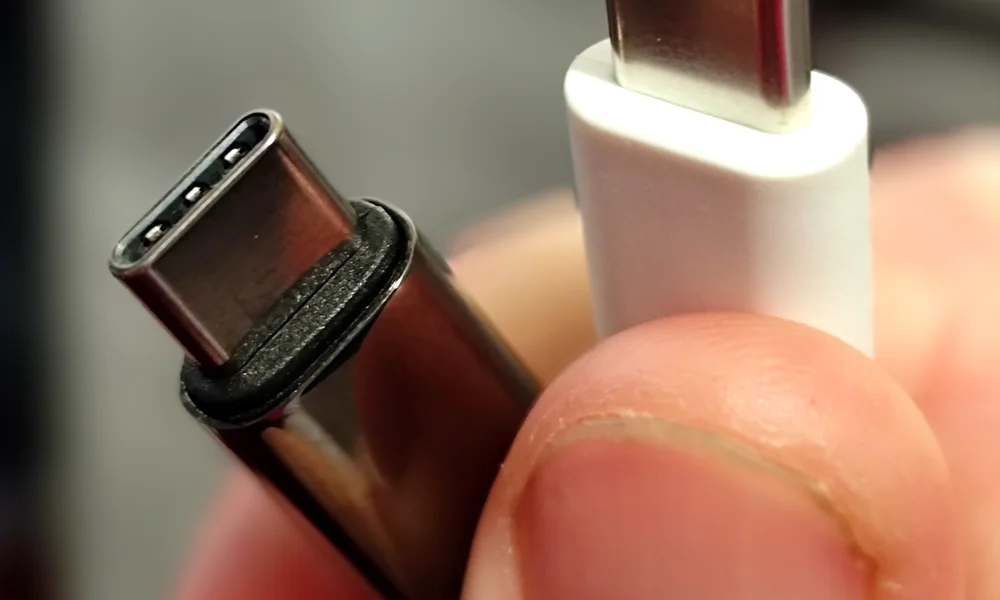
Lightning is Apple’s older iPhone plug, a flat connector with exposed pins that still matters because millions of older iPhones, AirPods cases and accessories use it. A Lightning cable needs a chip inside the connector that tells the phone it is genuine, and cheap cables without that chip often trigger a warning or stop working after a software update. If your household still has Lightning devices, buy a certified Lightning cable from a brand you recognise.
Micro-USB is the older, trapezoid-shaped plug found on ageing Kindles, speakers and small gadgets. It plugs in only one way up and charges slowly, but keep one good cable in a drawer for the older device that needs it. USB-A is the flat rectangular plug on the charger end of many older cables, still common on wall chargers, cars and power banks.
Our separate guide to the best USB-C cables goes deep on USB-C alone, covering power delivery ratings, data speeds and USB4. This guide is broader: it helps you choose across all connectors, so the cable you buy matches every device in your household. HDMI cables, by contrast, carry picture and sound to a television rather than power to a phone, and they play no part here.
Charging Cables Compared
| Cable type | Best for | Typical power | Data speed |
|---|---|---|---|
| USB-C to USB-C, 60W | Phones and small tablets | Up to 60W | USB 2.0 to 10 Gbps |
| USB-C to USB-C, 100W or 240W | Laptops and docks | 100W to 240W | 10 Gbps and faster |
| USB-A to USB-C | Older chargers and cars | Up to 60W | USB 2.0 typically |
| Lightning | Older iPhones and AirPods | Up to 20W or so | USB 2.0 typically |
| Micro-USB | Older gadgets and speakers | Up to 15W | USB 2.0 typically |
| Short travel cable, 0.3 m | Power banks and bags | 60W typically | Charging only, often |
The table makes one point clearly: there is no single best charging cable, only a best cable for a particular device and place. A 240W USB-C cable is wasted on a phone, and a 60W phone cable is useless for a laptop. Buy for the most demanding device the cable will serve.
The Best Charging Cables by Job
The best everyday cable is a braided one-metre USB-C cable rated at 60W or 100W. At one metre it reaches from a wall socket to a desk or a bedside table without leaving a coil of slack to tangle, and the braid resists fraying where the cable meets the connector, which is where nearly every cable dies.
The best travel cable is short, tough and tangle-free. A 0.3 metre cable charges a phone from a power bank without a loop of wire spilling out of a pocket, and it cannot tangle into the knot every traveller knows. The best travel cables pair a short length with a thick braid and a reinforced connector, because bag cables get bent and yanked far more than desk cables.
The best desk cable is a two-metre USB-C cable rated at 100W or 240W. It needs to reach from a charger under the desk to a laptop on top of it, carry enough power for a full-size laptop, and ideally move data at full speed too. The best two-metre cables deliver 240W of power delivery and 10 gigabits per second or faster data, replacing two cables at once: the charger cable and the data cable.
Length, Braid and Strain Relief
Length is the most practical choice you will make, and it is the one most people get wrong by buying too long. A cable that is too long tangles, drags on the floor and wears out faster at the connector because it is always under tension. A cable that is too short pulls the charger off the desk. Measure the distance from your usual charger to your usual seat, add a little slack, and buy that length.

The jacket is the cable’s skin, and it decides how long the cable survives. Braided nylon survives bending far better than thin rubber, and it resists the kinks that come from being coiled daily. Silicone is the softest and most tangle-resistant, but it attracts dust and costs more. Strain relief is the reinforced sleeve where the cable meets the connector: a long, flexible one spreads the bending force so the wires inside do not snap at one sharp point. Bend a cable gently at the connector before you buy: if it flexes smoothly, it will last; if it kinks sharply, it will not. Our guide to cable management covers the clips, ties and trays that keep a desk and a drawer under control.
When to Replace a Cable
Cables rarely fail all at once. They fail slowly, and the signs are easy to miss until the phone stops charging altogether. The first sign is fraying at the connector, where the jacket splits and the wires inside show through. A frayed cable is a safety risk, because exposed wires can short, spark or overheat. Retire any cable the moment you see bare wire.
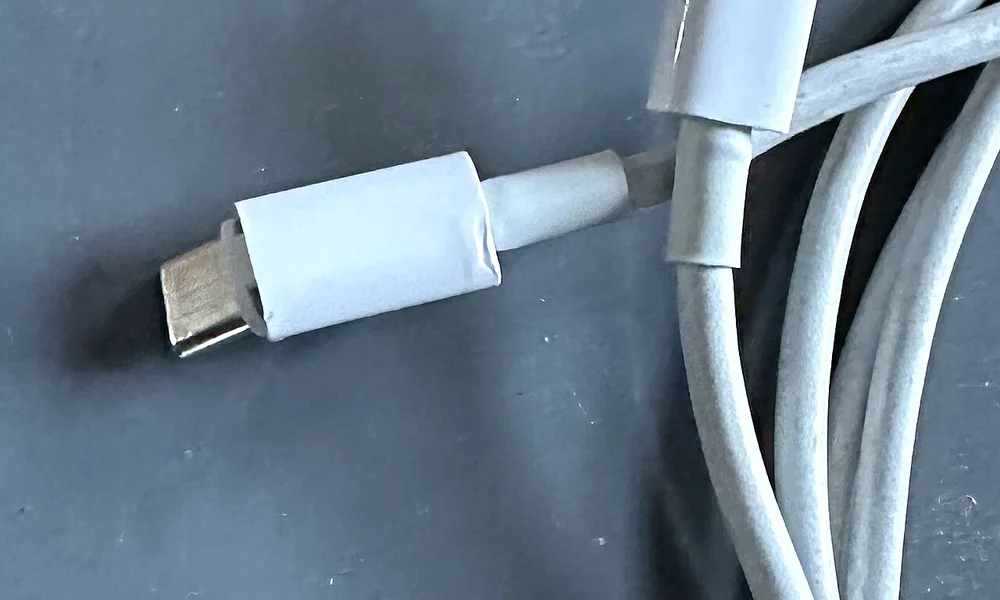
The second sign is a loose connection. If you have to wiggle the cable to start charging, the connector is worn or the port is full of lint. Clean the port gently with a wooden toothpick first, because pocket lint is often the real culprit, but if a new cable fits tightly and the old one does not, the old cable is done. The third sign is slow charging with no other explanation, and the fourth is heat: a hot connector means something is wrong inside it, so stop using it immediately. The same applies to any cable that has been bent sharply or chewed by a pet, even if it still works.
Before You Buy: The Checklist
- Check the device end first: USB-C, Lightning or Micro-USB, and buy the connector your device actually has.
- Check the charger end too: USB-C to USB-C suits modern chargers, USB-A to USB-C suits older wall chargers and cars.
- Match the wattage to the most demanding device the cable will serve: 60W for phones, 100W or 240W for laptops.
- Read the data rating if you transfer files: 10 Gbps or faster for video and large photo libraries.
- Choose the length for the place it will live: 0.3 m for travel, 1 m for a desk, 2 m for a bedside or a sofa.
- Look for certification, a braided jacket and long, flexible strain relief before you look at the price.
Frequently Asked Questions
Does a more expensive charging cable charge faster?
Not on its own. Charging speed is set by the slowest of the cable, the charger and the device. What a better cable buys is durability, honest ratings and safety: it delivers the wattage it claims for years rather than months.
Can I use any USB-C cable for my laptop?
No. A laptop needs a cable rated at 100W or 240W, and many phone cables are rated at 60W or less. A 60W cable will charge a laptop slowly, or not at all while it is in use. Check the wattage on the cable or its packaging first.
Why does my phone charge slowly with a new cable?
The usual causes are a low-wattage charger, a cable rated below what the phone can take, or a dirty charging port. Try the same cable with a stronger charger, then a different cable with the same charger, and clean the port gently. If the phone charges quickly with another cable, the new cable is the weak link.
Are braided cables really better?
For cables that move around, yes. Braided nylon resists the bending and abrasion that kills rubber jackets, especially at the connector. For a cable that sits untouched behind a desk, the jacket matters far less.
How long should a charging cable last?
A good cable used daily should last two to three years, and a desk cable that rarely moves can last much longer. Replace a cable at the first sign of fraying, looseness or heat.
Do I still need a Lightning cable in 2026?
Only if you still own Lightning devices. New iPhones use USB-C, but older iPhones, AirPods cases and accessories still charge over Lightning. Keep one certified Lightning cable for those devices, and buy USB-C for everything new.
Bottom Line
The best charging cable matches your device, your charger and your daily routine, and then disappears into the background. Buy the right connector, enough wattage for the most demanding device it will serve, and the right length for where it will live, and pay a little extra for certification, a braided jacket and proper strain relief. The wall charger matters too, so if your brick is the weak link, our guide to the best phone chargers will help you match the two halves of the charging chain.